下面我给大家介绍一下,如何在lunarpages的win主机的面板中自定义404错误页面:
1.首先我们要在本地新建一个404错误页面,然后把这个页面命名为404.html;上传到空间里,我们可以放在根目录下,也可以放在新建的子目录里;
2.然后登陆我们的plesk面板:第一步点击home进入主页,例如我要定义lity.com这个域名的错误页面,
首先我们要进入这个域名下进入到这个域名下的操作界面.
3.进入之后在面板Hosting 下我们可以看到这个图标:Web Directories;

4.点击这个图标后可以看到里面有一个导航,导航上有一个error documents(错误文档);点击这个进行设置:
设置如下:点击你要设置的错误页面,例如我是要设置404,那我就点击404;
5.点击之后可以看到如下界面:
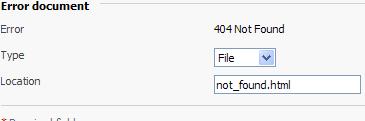
设置图中的type为url;location设置你存放自己定义的错误页面的位置,
例如我把他放在根目录那要怎么设置呢,要这样设置,/404.html;
如果放在子文件夹中可以这样设置/Folder/404.html;
lunarpages自从2010 .7.6号开始就一直在升级cpanel面板,现在一直还在升级过程中,上次我登陆了lunarpages的cpanel面板看了一下,发现以前的cpanel面板不能做A记录,现在升级后的可以做A记录了,以前的不能做mx记录现在的也都可以了,我还发现在文件管理里面filemanager里面可以压缩文件和下载文件,呵呵,对于我们以后备份后下载文件就容易多了,我心里非常的高兴,我还发现lunarpages的cpanel面板还新增了可以查看资源使用情况,就是可以查看cpu的使用情况,这样我们就可以时刻注意不超资源了。
从7.6号开始lunarpages公司开始升级他们的cpanel面板及服务器,其中包括mysql版本等
Hello,
All shared cPanel servers will get PHP, MySQL and cPanel theme components upgraded starting Tuesday July 6th 2010. Pending updates with exact dates and server names and their completions will be announced here. The upgrade details are as follows.
……………………………………………………………(中间部分省略)
Finally, we will be updating the theme on the server. The new theme will allow us to provide compatibility with the newest cPanel 11.25.1 version and offer additional options that the older theme did not provide.
查看原文可以到lunarpages官方论坛